DLTK's Christmas Crafts for Kids
Plastic Canvas Christmas Tree Ornaments

front

back
Attach two squares together to make these pretty ornaments for the Christmas Tree. These are fun first stitching projects for grade school children.
The fact that you attach two squares together back to back to make the ornament means that the young stitchers don't have to worry about keeping the knots and thread ends at the back of the project neat.
Materials:
- plastic canvas cut into a 20x20 grid square
- needle large enough to hold wool
- wool in colors indicated on the patterns
- scissors
Instructions:
 Cut your plastic canvas so there are 20 squares across and 20 down
-- (I always pre-cut the 20x20 grid, but you can trim it at the end
if you're not in the mood to count out the squares).
Cut your plastic canvas so there are 20 squares across and 20 down
-- (I always pre-cut the 20x20 grid, but you can trim it at the end
if you're not in the mood to count out the squares).- Print out the template of choice:
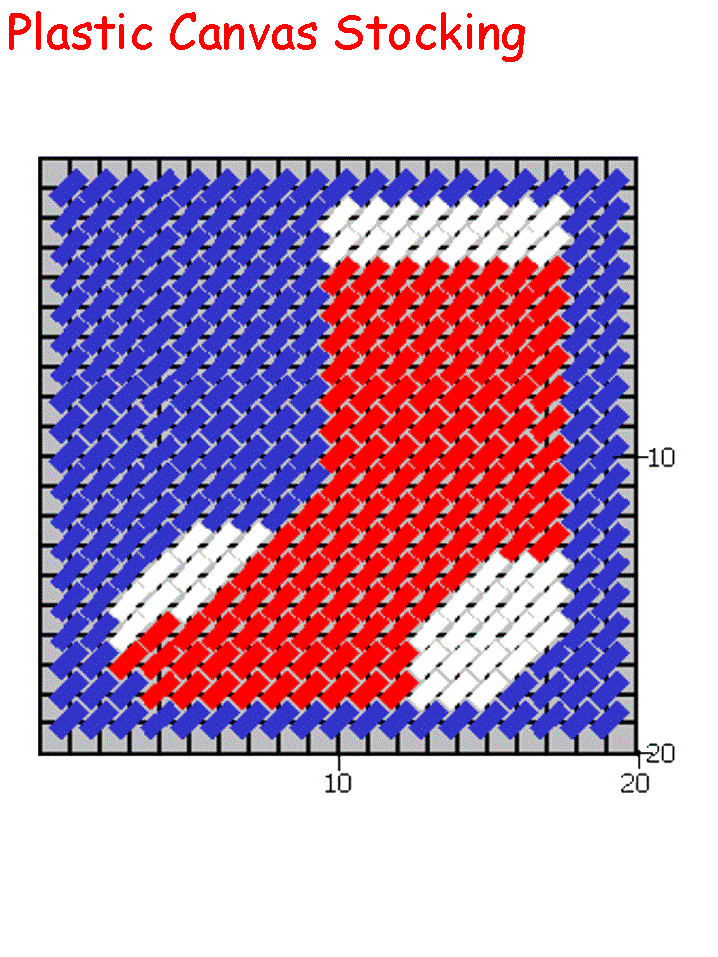
- There is a picture and word template for each ornament.
- Some people find the pictures easier to follow and some the words -- if you aren't sure which you prefer, print them both out.
- Stitch the ornament according to the pattern:
- Feel free to substitute colors according to what you have on hand and what you think looks pretty.
- The back will not be visible, so tie off your wool in the back without worrying about the mess.
- Repeat the ENTIRE process with the same pattern or with a different
pattern (the front and back of your ornament can be two different designs)
- Tasha usually does the front of her ornament in a pattern and designs her own big "T" for the back so recipients remember who made it for them.
- I've also done them so each of my girls picks a pattern and stitches it. Then I use these two squares to make the ornament (which we give to grandparents, etc from the both of them).
- Once you have two squares completely stitched, line them up back to back and tie in the top corner, leaving a loop of wool for hanging on the tree.
- Whip stitch the outside with wool in the color of your choice (I
typically use white).
- you want to stitch through both squares so at the end they're attached together to make one ornament that looks nice front and back.
Templates:
- Close template window when done printing to return to this screen.
- Set page margins to zero if you have trouble fitting the template on one page (FILE, PAGE SETUP or FILE, PRINTER SETUP in most browsers).
Ornament Template (image) or (words)
Stocking Template (image) or (words)
Printable version of these instructions